LEFT · I–VII
Choose the root degree
Move your left palm horizontally across the on-screen rail. Hold a new lane briefly until the interface confirms it.
First performance tutorial
This Gesture Synth tutorial explains how to use Gesture Synth from camera setup to your first progression: position both hands, choose roots and chords, then shape volume and filter.
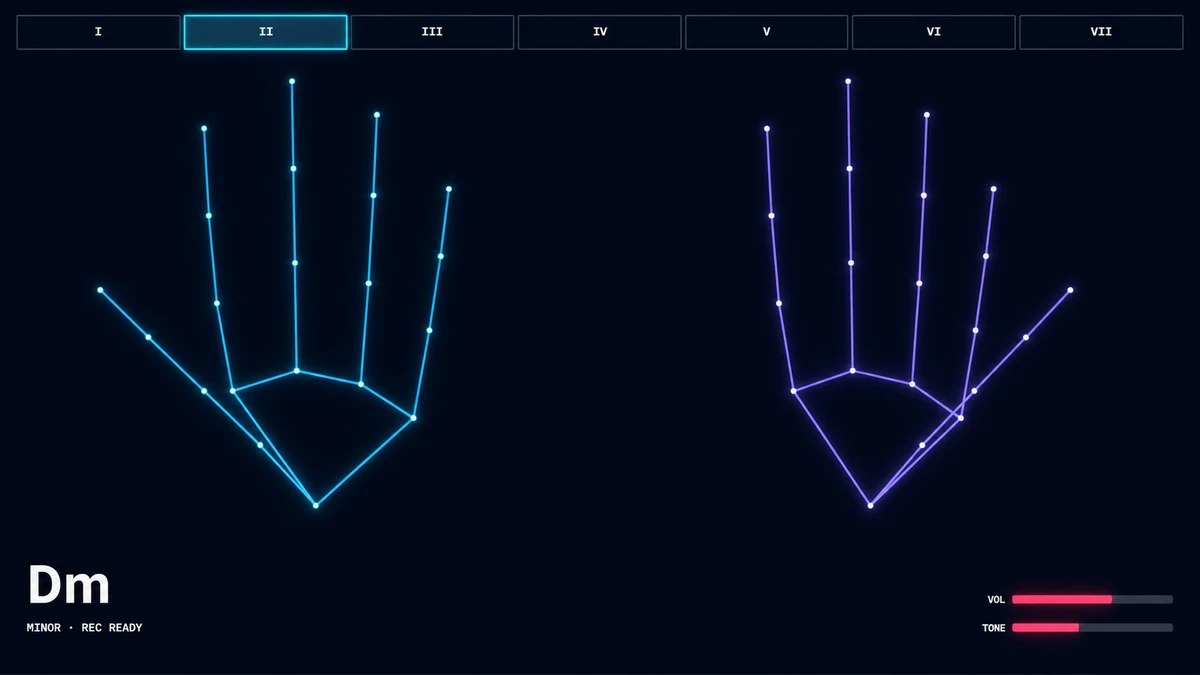
Move your left palm across the I–VII rail to choose a root. Count the extended fingers on your right hand to choose a chord type. Then move that right palm up and down for volume or left and right for the filter.
Use the playable Gesture Synth homepage. This guide does not request camera access.
Allow video access when the browser asks. Gesture Synth requests the camera only; it does not request microphone audio.
Keep both hands separated and fully inside the camera stage while the tracker loads.
LEFT · I–VII
Move your left palm horizontally across the on-screen rail. Hold a new lane briefly until the interface confirms it.
RIGHT · 0–5
RIGHT · X/Y
Raise your right palm for more volume and lower it for less. Move your right palm to the right for a brighter, more open filter or left for a darker tone.
The live tutorial follows this same sequence and advances only after the current signal is recognized.
Keep the key on C for all three exercises. Work slowly enough that each left-hand lane and right-hand shape settles before you move on.
Exercise 1
Exercise 2
Practice the left-hand move first. Keep one right-hand finger extended throughout so the quality stays Major.
ChordsC ↔ G
Left handI ↔ V
Right hand1 ↔ 1
Exercise 3
Change the left-hand lane first, let it settle, then confirm the right-hand finger count. Begin with C → G → Am → F, then use the two variations to practice different root orders.
ChordsC → G → Am → F
Left handI → V → VI → IV
Right hand1 → 1 → 2 → 1
ChordsC → F → G → C
Left handI → IV → V → I
Right hand1 → 1 → 1 → 1
ChordsAm → F → C → G
Left handVI → IV → I → V
Right hand2 → 1 → 1 → 1
When all three loops feel steady, use the complete Gesture Synth chord reference to transpose the same hand logic to another key or try another quality.
Face the whole palm toward the camera. Keep every fingertip visible and clearly fold fingers that should not count, especially the thumb.
Move farther from the camera, separate your hands, and stay in the comfortable center of the frame.
Pause briefly on each root lane and hand shape. Fast movement or a busy background can make the current frame uncertain.
Both hands must be visible. A closed right fist means 0 fingers and intentionally selects Mute; raise the right palm after choosing a non-muted shape.
Use brighter, even light and keep the camera around chest or shoulder height. Avoid strong backlight behind your hands.
Use the Gesture Synth chord guide for root degrees, finger types, and examples.
No specific webcam model is required. An integrated or external camera can work when the browser can access it and can keep both hands clear in the frame.
Yes. The right palm’s vertical position controls volume while its horizontal position controls the filter. Those two expression controls update while the right-hand finger shape continues to select the chord quality.
Make sure both hands are visible, the left hand has settled on an I–VII lane, and the right hand shows at least one extended finger instead of a closed fist. Then raise the right palm above the lowest volume position. If camera or audio startup fails, use the retry action shown by the instrument.
The instrument passes video frames to the MediaPipe hand tracker running in your browser; the application does not upload those camera frames. The page still downloads its hand-tracking assets and may make ordinary analytics requests.
Try C → F → G → C to keep one Major finger shape while changing roots. Then try Am → F → C → G, which begins with two fingers for Minor before returning to one-finger Major chords.
Play separate notes on the air piano, explore continuous pitch with the virtual theremin, or compare the controls in the gesture music guide.