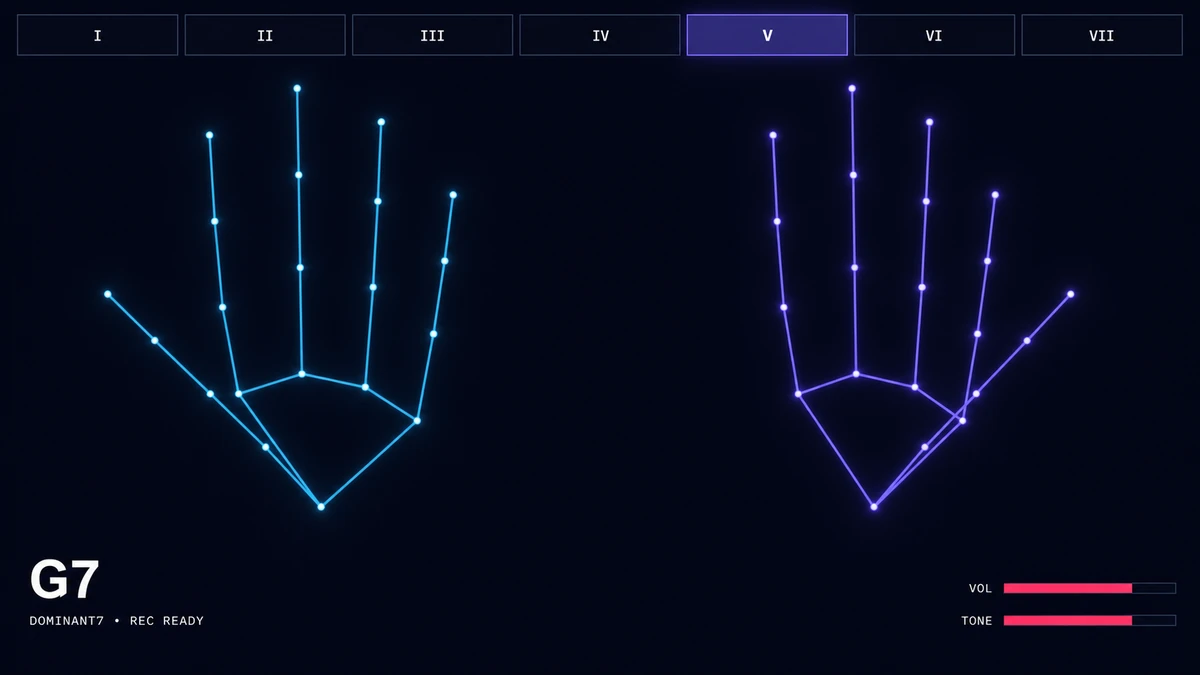
Gesture Synth chords are selected by combining a left-hand I–VII root degree with a right-hand chord-quality gesture: a fist (0 fingers) mutes; 1 finger selects Major; 2 Minor; 3 Dominant 7; 4 Major 7; and 5 Sus4. Choose any of 12 tonic keys in the interactive reference below.
Gesture Synth Chords: Build the Chord Your Hands Will Play
Choose the same three signals the instrument reads: key, left-hand root degree, and right-hand finger count.
Tap a note or chord to hear it. No camera is needed for these short sound previews.
Tap a note or chord to listen. No camera needed.
Swipe the tables sideways to see all columns. Tap a highlighted note or chord to listen.
Gesture Synth hand gestures and chord qualities
Right-hand fingers
Quality
Formula / intervals
Example on C
0
Mute
No sounding chord
1
Major
Root · major third · fifth
2
Minor
Root · minor third · fifth
3
Dominant 7
Major triad · minor seventh
4
Major 7
Major triad · major seventh
5
Sus4
Root · fourth · fifth
I–VII root degrees in all 12 major keys
Key
I
II
III
IV
V
VI
VII
C
C#
D
D#
E
F
F#
G
G#
A
A#
B
Complete Gesture Synth chord matrix in C
Root degree
Major
Minor
Dominant 7
Major 7
Sus4
IC
IID
IIIE
IVF
VG
VIA
VIIB
A closed right fist mutes the instrument regardless of the selected root. Use the selector above to explore the same five sounding qualities in any of the 12 keys.
The mapping rule
Root degree and chord type are independent
Each tonic key defines seven roots from its major scale, labeled I–VII. Your right-hand finger count applies one chord type to whichever root is active. In C, lane II is D; one right-hand finger produces D major, not D minor.
Chord formulas
Gesture Synth Chords: Major, Minor, 7th, Maj7 and Sus4 Reference
The table above gives the compact formulas. These listening cues explain when each quality is useful and how to make it with your right hand.
1 finger
Major
Major sounds clear, steady, and direct. It works well for a starting chord, a strong ending, or any change that should feel settled.
Show one extended right-hand finger while the left hand holds a root lane. With key C and lane I, the result is C major: C · E · G.
2 fingers
Minor
Minor sounds darker and more reflective than Major. Use it for contrast inside a bright progression or as the center of a moodier loop.
Show two extended right-hand fingers. With key C and lane I, Gesture Synth plays C minor (Cm): C · D# · G under the project’s current sharp-based note spelling.
3 fingers
Dominant 7
Dominant 7 adds a tense, bluesy pull that wants to move to another chord. It is useful before a return to a stable Major chord.
Show three extended right-hand fingers. Key C with lane V produces G7: G · B · D · F, a practical lead-in back to C.
4 fingers
Major 7
Major 7 keeps the brightness of Major but adds a softer, more spacious color. Use it for a calm sustained chord or a smooth transition.
Show four extended right-hand fingers. Key C with lane I produces Cmaj7: C · E · G · B.
5 fingers
Sus4
Sus4 replaces the third with a fourth, so the result feels open and unresolved rather than clearly Major or Minor. It works well as a brief lift before returning to Major.
Open the whole right hand with five extended fingers. Key C with lane I produces Csus4: C · F · G.
0 fingers
Mute
Mute produces no sounding chord. Use it to make a clean stop, create space between changes, or reset your right-hand shape without an accidental chord.
Close the right hand into a fist. The instrument stays muted regardless of the current key or left-hand root lane.
The key selector sets the tonic. Your left-hand lane chooses one of that key’s I–VII roots, and your right-hand finger count chooses Mute, Major, Minor, Dominant 7, Major 7, or Sus4. The two choices combine into the displayed chord.
Does the left hand choose the chord root or chord quality?
The left hand chooses only the root degree. Chord quality comes from the right-hand finger count, so you can apply any supported quality to any I–VII root.
Why does II + Major produce a major chord instead of the diatonic minor chord?
Gesture Synth treats root degree and quality as independent controls. In key C, II chooses D as the root; one right-hand finger explicitly asks for Major, so the result is D major rather than the D minor chord found naturally in the C-major scale.
What does a closed right fist do?
A closed fist counts as 0 extended fingers and selects Mute. It stops the sounding chord regardless of the selected key or root degree.
Can Gesture Synth play diminished or augmented chords?
No. The current version supports five sounding qualities—Major, Minor, Dominant 7, Major 7, and Sus4—plus Mute. Diminished and augmented shapes are not available.
What is the easiest chord change to practice first?
Start with C ↔ G in key C: move the left hand between I and V while keeping one right-hand finger extended for Major. Then try C → F → G → C, which also keeps the right-hand shape unchanged.